Is the Sega Genesis Stereo or Mono? The Ultimate Audio Guide for Retro Gamers
Introduction: The Legendary Sound of Sega’s 16-Bit Era
When retro gaming enthusiasts debate the 16-bit console wars of the early 1990s, the conversation inevitably turns to audio. While Nintendo’s Super NES featured sampled PCM audio, the Sega Genesis (known outside North America as the Mega Drive) took a radically different approach. Sega relied on raw, aggressive FM synthesis—giving games like Sonic the Hedgehog, Streets of Rage, and Shinobi III an iconic, gritty soundtrack that defined an era.
However, if you are connecting a vintage Sega Genesis or Mega Drive to a modern home theater setup or CRT TV, you might stumble upon a confusing hardware question:
Is the Sega Genesis audio stereo or mono?
The short answer is: It supports both, but it entirely depends on which hardware revision you own and how you connect it.
In this comprehensive guide, we will break down the hardware revisions of the Sega Genesis / Mega Drive, explain the audio signal routing of Model 1 versus Model 2 consoles, delve into the legendary Yamaha YM2612 sound chip, and show you exactly how to get crystal-clear stereo audio from your setup today.
1. The Short Answer: Stereo Capability Across Hardware Revisions
To understand whether your console outputs stereo or mono sound, you must first identify which model of the Genesis or Mega Drive you own. Sega redesigned the internal hardware multiple times throughout the console’s lifespan, leading to drastically different audio output configurations.
Summary of Sega Genesis Audio Capabilities
| Console Revision | Rear AV Port Output | Headphone Jack Output | Native Stereo Out of the Box? |
| Model 1 (Original) | Mono Only | Stereo | Yes (via front headphone jack) |
| Model 2 (Redesigned) | Stereo & Mono | None | Yes (via multi-AV port) |
| Model 3 (Late Budget) | Mono Only | None | No (Requires Hardware Mod) |
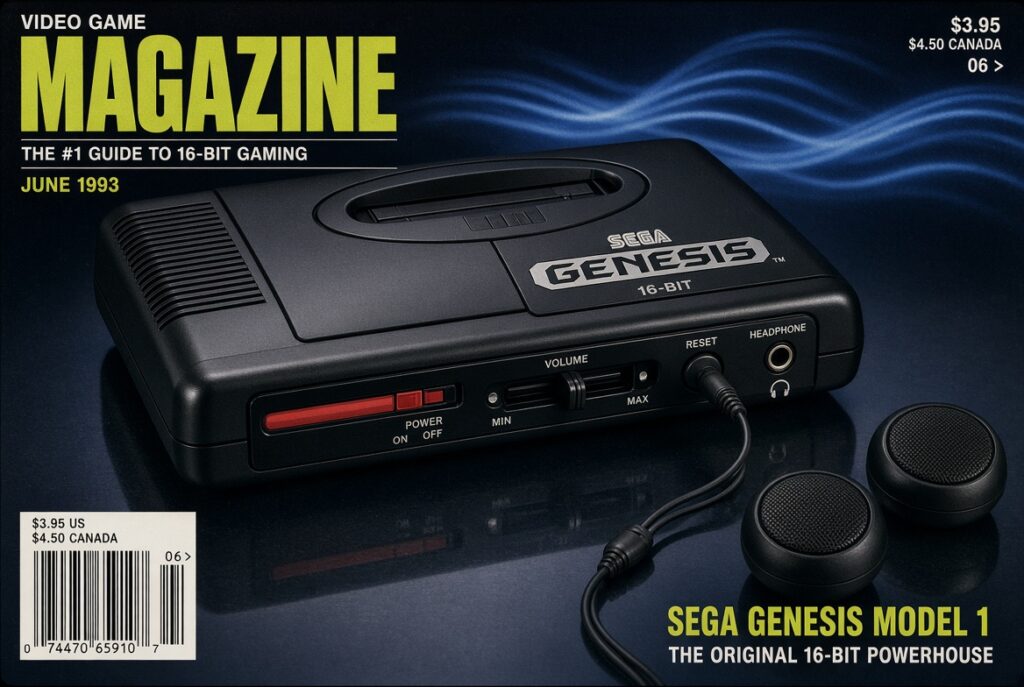
2. Model 1 Sega Genesis: The Front-Jack Stereo Secret
The original Sega Genesis—often referred to as the Model 1—is easily recognized by its bold “High Definition Graphics” text (on early motherboard revisions) and its prominent volume slider on the front left corner.
The Rear AV Port Delivers Mono Only
If you plug a standard composite AV cable into the single DIN port on the back of a Model 1 Genesis, you are receiving a mono audio signal. Even if your AV cable splits into red and white RCA plugs at the end, both cables are simply carrying the exact same mono sound duplicated across two channels.
How to Get Stereo Sound from a Model 1
The internal audio circuit of the Model 1 actually generates full dual-channel stereo sound. However, Sega routed the stereo mixing circuit exclusively through the 3.5mm headphone jack located on the front panel.
To achieve true stereo audio from a Model 1 Sega Genesis:
- Connect a 3.5mm stereo aux-to-RCA cable into the front headphone jack.
- Plug the RCA connectors (red and white) directly into your TV, stereo receiver, or audio capture card.
- Keep the rear video cable connected to your TV for the display signal (ignoring the audio RCA plug on that rear cable).
- Adjust the front volume slider to around 70–80% for optimal gain without causing signal distortion.
3. Model 2 Sega Genesis: Rear Stereo Output
In 1993, Sega introduced the Model 2, featuring a smaller, squarer footprint and removing the front headphone jack and volume slider entirely.
Updated Multi-AV Port
Unlike the Model 1, the Model 2 replaced the old 8-pin DIN port with a proprietary 9-pin mini-DIN port. This updated connector directly routes both left and right stereo audio channels alongside composite video, S-Video, and RGB signals.
If you purchase a proper Model 2 stereo AV cable or SCART/HD Retrovision component cable, you will get native stereo sound directly out of the rear port without needing secondary cables or adapters.
Caution Regarding Audio Quality: While the Model 2 supports native stereo from the rear, early Model 2 motherboard revisions (particularly VA1 and VA2 boards) suffer from poorly engineered internal audio amplifiers. This results in muffled sound, harsh distortion, and unwanted audio hiss. Later revisions and community hardware mods (such as the popular Triple Bypass Mod) fix these filtering issues completely.
4. Under the Hood: The Yamaha YM2612 FM Synthesis Chip
At the heart of the Sega Genesis’s audio architecture sits the famous Yamaha YM2612 (along with a secondary Zilog Z80 coprocessor to handle sound driver instruction routines).
How the YM2612 Generates Stereo Sound
The YM2612 is a 6-channel Frequency Modulation (FM) synthesis chip. Unlike static mono sound chips of older 8-bit consoles, the YM2612 includes built-in channel panning capabilities:
- Independent Channel Panning: Developers could assign each of the 6 FM channels to output to the Left channel, Right channel, or Center (Both).
- Dynamic Audio Spatialization: Composers used this panning feature to create immersive soundscapes. For instance, in racing games or shooters, sound effects and musical arpeggios could sweep dramatically from the left speaker to the right speaker.
- PCM Sample Playback: The 6th channel of the YM2612 could be converted to play digitized PCM audio samples (such as the famous “SEGA!” chant or voice clips in Mortal Kombat), which could also be panned across the stereo field.
Because developers specifically composed music with stereo separation in mind, playing games in mono means missing out on the full spatial depth of 16-bit sound design.
5. How to Setup Stereo Sound for Modern TV Displays
If you are setting up your Sega Genesis on a modern display or connecting it through a upscaler like the OSSC (Open Source Scan Converter) or RetroTINK, here are the recommended connection configurations to ensure true stereo output:
Configuration 1: Sega Genesis Model 1
- Video Output: Rear 8-Pin DIN cable to console -> Upscaler / TV
- Audio Output: 3.5mm Aux-to-RCA cable from Front Headphone Port -> Audio Input on TV / Receiver / Upscaler
Configuration 2: Sega Genesis Model 2
- Video & Audio Output: High-quality 9-pin Mini-DIN Stereo AV Cable (or HD Retrovision Genesis YPbPr Component Cable) directly into TV or Upscaler.
Configuration 3: Sega CD / Mega CD Setup
If you connect an original Sega CD attachment to your Genesis Model 1, you can pass the stereo audio signal from the front headphone jack into the Sega CD’s rear mixing line using a short 3.5mm patch cable. This routes both FM chip synth music and Redbook CD audio into one unified stereo output from the back of the Sega CD.
Conclusion
So, is the Sega Genesis / Mega Drive stereo or mono?
The original hardware is fully capable of generating true 16-bit stereo audio. However, if you own a Model 1, you must utilize the front 3.5mm headphone jack to experience stereo sound, as the rear port outputs mono only. If you own a Model 2, stereo sound is accessible directly from the rear AV port with the correct cable.
Understanding these hardware nuances ensures you hear classic video game soundtracks exactly as their legendary composers intended—loud, vibrant, and in full dual-channel stereo.
Frequently Asked Questions (FAQ)
Q1: Can I use a mono AV cable on a stereo setup?
Yes, but you will only hear audio out of one speaker, or the exact same mono sound duplicated across both speakers if you use a splitter cable.
Q2: What is the “Triple Bypass Mod” for Sega Genesis?
The Triple Bypass (3BP) is a popular open-source community modification board that replaces the poor audio amplifier circuits found in certain Genesis revisions. It provides pristine stereo audio output and clean RGB video signals.
Q3: Does the Sega Genesis Model 3 support stereo sound?
No. The official Model 3 released by Majesco removed stereo audio processing entirely to reduce manufacturing costs. To get stereo sound from a Model 3, a hardware modification is required.
Join the Discussion
What is your favorite Sega Genesis soundtrack? Are you using an original Model 1 headphone jack setup or an upgraded RGB stereo cable? Let us know in the comments below!
\ Get the latest news /
